Using the Hoover PowerScrub Deluxe is simple when you prepare the machine, fill both tanks correctly, clean in slow passes, and allow enough drying time. Following the proper cleaning sequence improves stain removal, protects carpet fibers, and helps the machine perform consistently.
The Hoover PowerScrub Deluxe Carpet Cleaner Machine remains a popular choice for deep carpet care because it combines rotating brushes with automatic detergent mixing. Studies show that indoor carpets can trap pounds of dust yearly, while regular deep cleaning helps reduce dirt buildup and improves carpet appearance. This guide explains every important step, from setup to maintenance, so you can clean confidently and achieve professional looking results at home.
What You Need Before You Start
Gather everything before turning on the cleaner to avoid unnecessary interruptions. Preparing first also makes the cleaning process smoother and faster.
- Hoover PowerScrub Deluxe
- Clean warm water
- Approved carpet cleaning solution
- Vacuum cleaner
- Clean microfiber towels
- Extension cord if necessary

Prepare the Carpet Properly
Vacuum the entire carpet before using the carpet cleaner. Dry vacuuming removes loose dirt that could reduce cleaning performance.
Next, move lightweight furniture away from the cleaning area whenever possible. Then inspect the carpet for stains requiring extra attention before cleaning.
Fill the Clean Water Tank
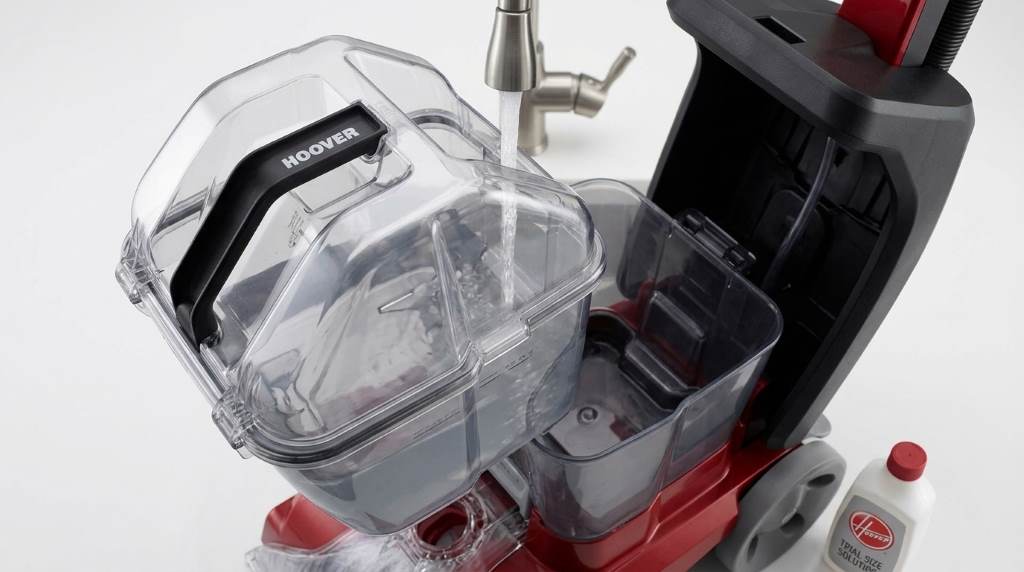
The clean water tank includes separate sections for water and cleaning solution. Always follow the fill markings printed on the tank.
Add warm water instead of hot water because excessive heat may damage machine components. Afterward, add the recommended cleaning solution without exceeding the maximum fill line.
Install the Tank Correctly
Place the filled tank back into the machine until it locks securely. A loose tank may interrupt water flow during cleaning.
Double check the connection before plugging the machine into a power outlet. Proper installation prevents leaks and improves cleaning consistency.
Choose the Correct Cleaning Mode
The Hoover PowerScrub Deluxe offers different cleaning settings for various carpet conditions. Select the appropriate mode before beginning your first cleaning pass.
Quick Clean
Use this setting for lightly soiled carpets that need freshening. It also reduces drying time after routine maintenance cleaning.
Deep Clean
Select this option for heavily soiled carpets or high traffic areas. The machine applies more solution for stronger cleaning performance.
How to Clean the Carpet Step by Step
Start cleaning from the farthest corner of the room and work toward the exit. This approach prevents walking across freshly cleaned carpet.
Push the cleaner forward slowly while squeezing the trigger to release cleaning solution. Then release the trigger while pulling the machine backward to extract dirty water.
Continue using overlapping passes across the carpet for complete coverage. Consistent overlap prevents streaks and uneven cleaning patterns.
Finally, make several dry passes without pressing the trigger. These extra passes remove additional moisture and shorten drying time.
Remove Tough Stains Effectively
Pre treat stubborn stains before using the carpet cleaner whenever possible. Allow the stain treatment to work according to product instructions.
Clean the stained area using slow overlapping passes instead of rushing. Repeat only when necessary because excessive cleaning may oversaturate carpet fibers.
Clean Upholstery with Attachments
The included hose and tool allow cleaning on furniture, stairs, and vehicle interiors. Attach the hose securely before beginning upholstery cleaning.
Apply cleaning solution carefully without soaking the fabric surface. Afterwards, extract as much moisture as possible using slow backward movements.
Empty the Dirty Water Tank
Turn off the machine before removing the recovery tank. Carry it carefully to a sink or drain for emptying.
Rinse the tank thoroughly after every cleaning session. Regular rinsing reduces odors and prevents residue buildup inside the container.
Clean the Brushes and Nozzles
Hair and carpet fibers often collect around rotating brushes after use. Remove debris immediately to maintain strong brush performance.
Wash removable parts with clean water and allow them to dry completely. Clean components last longer and perform more efficiently during future use.
Allow the Carpet to Dry
Open windows or operate ceiling fans to improve air circulation indoors. Better airflow helps moisture evaporate more quickly.
Avoid walking on damp carpet until it feels completely dry. Waiting protects carpet fibers and prevents fresh dirt from sticking immediately.
Common Mistakes to Avoid
Many cleaning problems result from small mistakes that are easy to prevent. Following simple practices protects both your carpet and machine.
- Skipping vacuuming before deep cleaning
- Using excessive cleaning solution
- Moving the machine too quickly
- Leaving dirty water inside the tank
- Ignoring routine brush cleaning
- Walking on wet carpet immediately
Helpful Maintenance Tips
Regular maintenance extends machine life and keeps cleaning performance consistent. Spending several minutes after each use prevents larger problems later.
- Rinse every removable tank after cleaning
- Store the machine indoors
- Inspect hoses for blockages regularly
- Clean brushes after every use
- Replace worn parts when necessary
- Keep the power cord neatly wrapped
Troubleshooting Common Problems
The Machine Does Not Spray Water
Check that the clean water tank sits correctly and contains enough solution. Also inspect the nozzle for possible clogs before continuing.
Poor Suction Performance
Empty the dirty water tank and confirm every seal fits tightly. Clean filters and remove debris blocking airflow whenever necessary.
Brushes Stop Rotating
Remove tangled hair or threads from the brush assembly carefully. Replace damaged brush components if cleaning does not restore movement.
Carpet Stays Wet Too Long
Reduce solution usage and perform additional extraction passes without spraying water. Increase room ventilation to improve drying speed.
When Should You Deep Clean Your Carpet?
Most households benefit from deep cleaning every six to twelve months. Homes with pets or children usually require more frequent cleaning sessions.
High traffic areas also deserve additional attention throughout the year. Regular maintenance keeps carpets looking cleaner and lasting longer.
Conclusion
Learning how to use the Hoover PowerScrub Deluxe correctly helps you achieve cleaner carpets with less effort. Follow the recommended preparation, cleaning, and maintenance steps every time for dependable results and longer machine life. Start your next carpet cleaning project with confidence and keep your floors looking their best throughout the year.
Frequently Asked Questions
Can I use hot water in the Hoover PowerScrub Deluxe?
No, use warm water because very hot water may damage machine components.
Should I vacuum before using the carpet cleaner?
Yes, vacuuming first removes loose dirt and improves deep cleaning performance.
How long does carpet usually take to dry?
Most carpets dry within several hours depending on airflow and humidity.
Can I clean upholstery with this machine?
Yes, use the included hose and upholstery attachment for suitable fabric surfaces.
How often should I clean the machine?
Clean the tanks, brushes, and attachments after every use for the best performance.