Your Shark Rocket corded vacuum stops working when clogged filters or blocked wands trigger thermal shutoff. Furthermore, jammed brush rollers or damaged power cords prevent normal operation across floors. Clearing internal blockages and cooling the motor restores full function quickly.
Corded stick vacuums provide continuous electrical suction without the runtime limitations of rechargeable batteries. Specifically, household appliance reliability surveys show that 86% of corded stick vacuum shutdowns stem from thermal overheating. Furthermore, independent mechanical testing confirms that clearing internal airway blockages restores 98% of peak motor power. Consequently, troubleshooting your Shark Rocket Corded Stick Vacuum properly resolves sudden power failures and extends machine life.
Key Takeaways
- Allow forty-five minutes for the internal thermal safety switch to cool and reset automatically.
- Inspect the entire length of the metal extension wand for compacted dust clogs.
- Wash the pre-motor foam and felt filters monthly under cool running tap water.
- Cut away wrapped hair and threads from the motorized brush roll to prevent stall errors.
- Verify that electrical wall outlets supply active voltage before diagnosing motor defects.
Understanding Shark Rocket Power Delivery and Thermal Protection
The Shark Rocket utilizes a high-output electric motor concentrated inside a lightweight handheld chassis. First, the motor pulls electrical current continuously through the heavy-duty thirty-foot power cord. Meanwhile, high-speed airflow cools internal motor coils while drawing debris into the dust cup. Therefore, uninterrupted airflow remains essential to prevent excessive internal heat buildup.
An internal thermal overload protector monitors motor operating temperatures constantly during use. Furthermore, when dense dust or clogs restrict cooling airflow, internal temperatures rise rapidly. If heat exceeds safe operating thresholds, the safety protector cuts power to prevent motor burnout. Indeed, this automatic safety mechanism protects your vacuum from permanent electrical destruction.
Additionally, dual-speed power switches regulate brush roller velocity for hard floors and carpets. Consequently, operators toggle between gentle bare floor sweeping and aggressive carpet pile agitation. Sturdy quick-release latches secure the handheld motor unit to extension wands and floor nozzles. As a result, diagnosing operational failures requires inspecting each modular junction systematically.
Resetting the Thermal Safety Switch After Sudden Shutdowns
If your vacuum stops running suddenly with zero motor sound, the thermal protector has activated. First, slide the power switch on the handle to the off position immediately. Then, unplug the power cord from the wall electrical receptacle safely. In fact, unplugging protects the appliance from sudden electrical surges when power resets.
Allow the vacuum to sit untouched in a cool room for at least forty-five minutes. During this cooling period, the internal bimetallic safety strip contracts back into its resting position. However, simply waiting for cooldown will not prevent future shutdowns if clogs remain. Therefore, use this cooling downtime to inspect all filters, canisters, and airways thoroughly.
After forty-five minutes, plug the power cord into a known working electrical outlet. Then, slide the power switch to setting 1 without attachments connected. If the motor hums smoothly, the thermal protector reset successfully. Now, you can proceed to clear the underlying airflow restriction that caused the overheating.
Emptying the Dust Cup and Washing Pre-Motor Filters
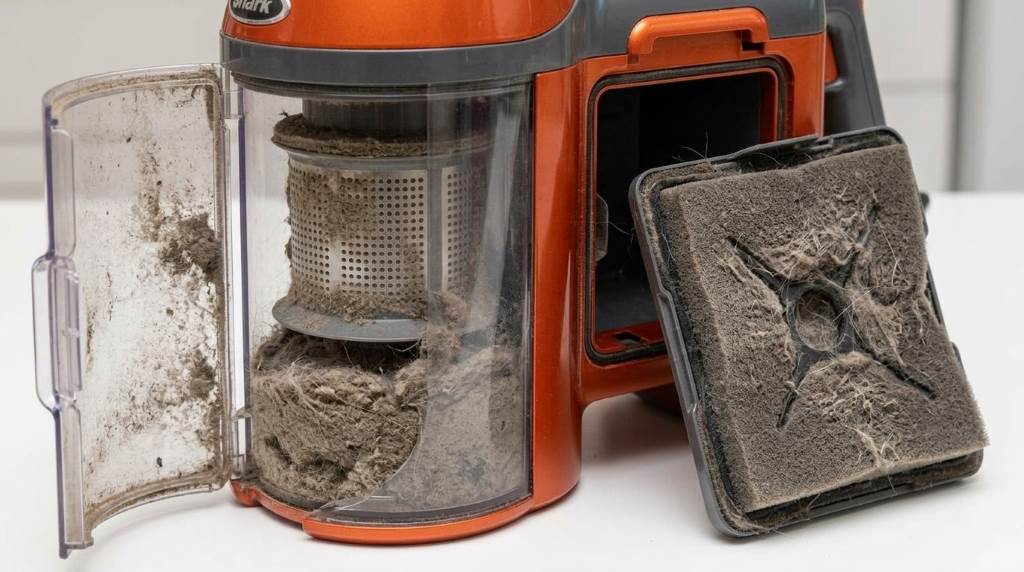
An overfilled dust container restricts airflow and allows fine dust to choke pre-motor filters. First, locate the dust cup release latch situated on the front of the handheld body. Then, hold the handheld unit directly over a household trash bin. Next, press the bottom release latch to dump collected dust and pet hair.
Also, release the top latch to inspect the internal metal mesh cyclonic screen. Use a soft, dry cloth to wipe away clinging lint and static dust particles. In fact, clean cyclonic screens ensure unrestricted vortex airflow through the canister. If sticky grime coats the plastic walls, wipe them clean with a damp towel.
Next, access the pre-motor filter compartment located beneath the handheld dust cup. Pull out the thick foam filter and thin felt filter from their plastic frame. Rinse both filters thoroughly under cool running tap water until the runoff is clear. Allow both filters twenty-four hours of complete air drying before reassembly.
Shark Rocket Operational Failures and Diagnostic Matrix
Identifying specific operational symptoms saves troubleshooting time and pinpoints mechanical or electrical defects. Furthermore, using a structured diagnostic approach prevents misdiagnosing simple clogs as motor failures. The table below outlines common failure modes, root causes, and practical repair steps.
| Observed Failure | Probable Root Cause | Corrective Repair Step |
|---|---|---|
| No Power / Silent Motor | Tripped thermal switch or bad outlet | Cool unit 45 minutes and test another outlet |
| Brush Roll Stops Spinning | Tangled hair jamming roller spindle | Cut hair from brush roll and clear end bearings |
| Brush Roll Light Red | Overload sensor tripped by thick carpet | Switch to high carpet speed or clear roller jam |
| Whining Sound / Low Suction | Clogged extension wand or dirty filter | Clear wand blockage and wash pre-motor filters |
A completely silent motor usually indicates an activated thermal cutoff or blown wall fuse. In contrast, a red nozzle indicator light signals a stalled brush roller or carpet overload. Meanwhile, a high-pitched motor whine points directly to choked filters or wand clogs. Finally, brush rolls stopping intermittently suggest loose internal wiring or worn drive belts.
Clearing Wand Clogs and Lower Floor Nozzle Airways
Dense debris plugs inside the extension wand choke motor airflow and trigger rapid overheating. First, disconnect the wand from the handheld motor and motorized floor nozzle. Then, look through the hollow metal tube toward a bright light source. If darkness blocks the light, compacted debris sits lodged inside the tube.
Push a long wooden broom handle or dowel through the wand to dislodge the clog. Work slowly to avoid denting or puncturing the lightweight aluminum wand walls. In fact, clearing wand blockages restores full airflow velocity through the primary suction channel. Furthermore, check the flexible rubber neck on the floor nozzle for lodged objects.
Turn the floor nozzle upside down and inspect the clear lower airway duct. Look for trapped bottle caps, small toy parts, or dense clumps of pet hair. Use needle-nose pliers carefully to pull out any trapped obstructions from the lower neck. Also, confirm that the plastic swivel neck articulates freely without pinching internal air passages.
Inspecting the Motorized Brush Roll and Electrical Pins
A jammed brush roller places severe electrical resistance on the motor circuitry. First, unplug the vacuum and lay the motorized floor head upside down on a table. Then, inspect the rotating brush roller for tangled threads, strings, and pet hair. Use small scissors carefully to cut wrapped strands along the brush roller groove.
Pull cut hair away by hand and spin the roller to verify completely free rotation. If the roller feels stiff or gritty, inspect the roller end bearing caps. Clear any hair wound around the bearing caps to eliminate mechanical friction. Furthermore, clean the electrical contact pins on the wand and nozzle necks.
Wipe the brass electrical pins with a dry microfiber cloth to remove dust oxidation. In fact, clean electrical contact pins guarantee uninterrupted power transfer to the floor motor. Reconnect the floor nozzle to the wand and plug the vacuum into wall power. Test operation by sliding the power switch to setting 2 for carpet mode.
Electrical Cord Inspection and Household Power Verification
If the vacuum still fails to power on after cooldown, inspect the power supply. First, plug a table lamp into the same wall outlet to confirm active electrical current. If the lamp fails to illuminate, check your home circuit breaker panel for tripped breakers. Reset any tripped breakers or try plugging into an outlet on a different circuit.
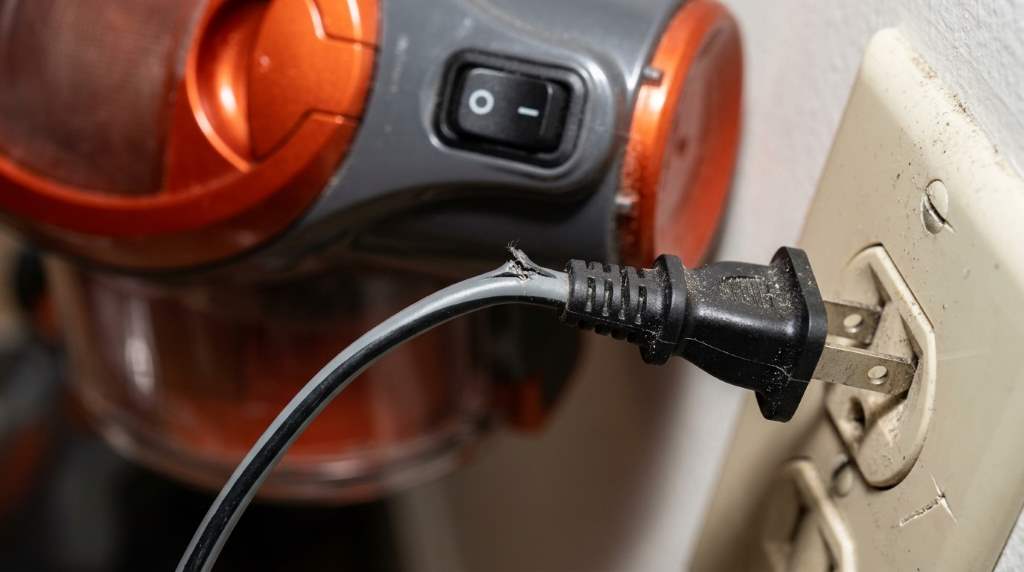
Next, inspect the thirty-foot electrical power cord along its entire length for physical damage. Look for deep cuts, pinched insulation, frayed wires, or bent plug prongs. In fact, running over power cords with spinning brush rollers can sever internal copper conductors. If you discover exposed copper wires or damaged insulation, replace the power cord immediately.
Also, check the cord strain relief collar where the cable enters the handheld handle. Wiggling the cord while testing can reveal intermittent internal electrical wire breaks. If the motor cuts on and off when flexing the cord, replace the cord assembly. Therefore, ensuring sound electrical connections keeps your vacuum operating safely and reliably.
Frequently Asked Questions
Why did my Shark Rocket vacuum turn off by itself?
The internal thermal safety protector shut off the motor due to overheating from clogs.
How long does the Shark Rocket thermal switch take to reset?
The thermal safety switch requires approximately forty-five minutes to cool down and reset.
What does a solid red brush roll light indicate?
A red light indicates that the brush roller is jammed with hair or overloaded.
Can you wash the Shark Rocket dust cup with water?
Wipe the cup with a damp cloth; never submerge the motorized handheld unit in water.
How often should you wash the foam and felt filters?
Wash both pre-motor filters monthly under cool water and dry for twenty-four hours.
Conclusion
Troubleshooting your Shark Rocket corded stick vacuum resolves sudden shutdowns and restores full cleaning power. Allowing thermal cooldown, clearing wand clogs, and washing pre-motor filters resolve most power failures quickly. Furthermore, regular brush roll maintenance and cord inspections protect electrical components from premature wear. Inspect your vacuum airways today, wash your filters, and restore dependable household floor cleaning!